
It started with a stack
When we first launched Palette more than five years ago, a single concept was at the heart of our vision: the Cluster Profile, often visualized as ‘the stack’.
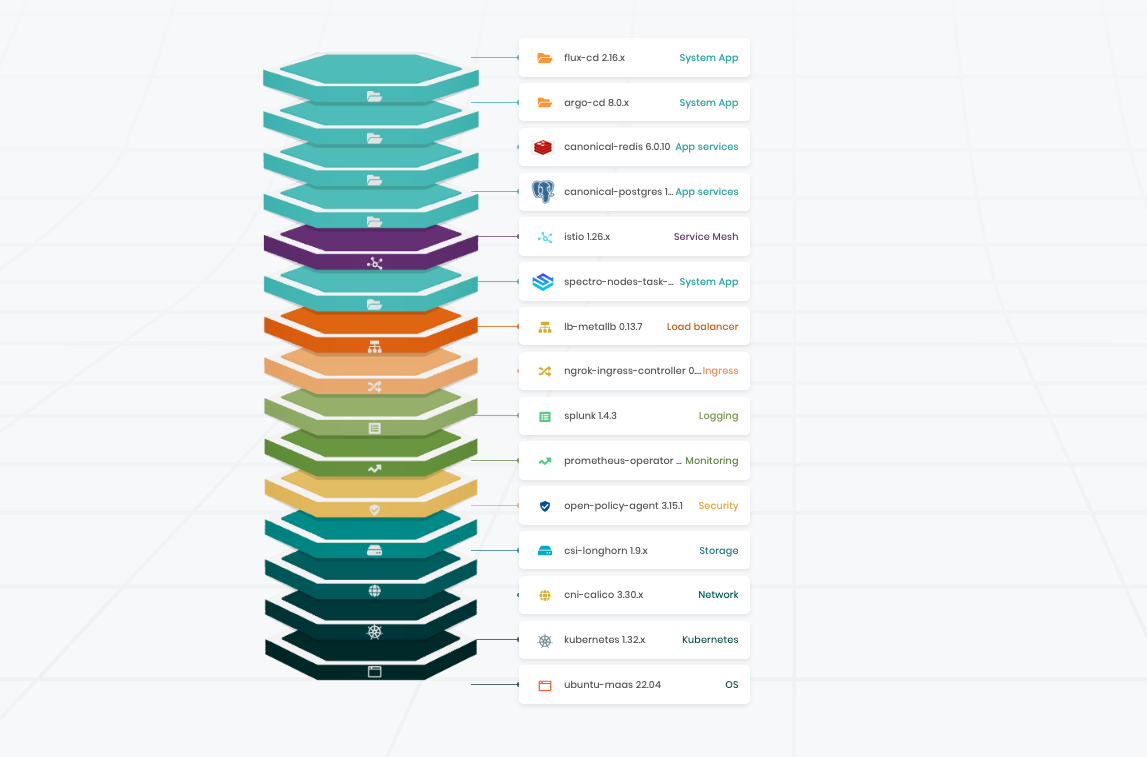
This was the critical construct that made our promise of automated, declarative Kubernetes fleet management possible.
By defining the ‘full stack’ of software that makes up a complete Kubernetes cluster, Cluster Profiles provide the source of truth that allows for automated reconciliation to eliminate drift. They simplify version-controlled upgrades. And of course they provide the blueprint for stamping out identical clusters, in their hundreds or thousands.
Five years on, this value remains as critical to enterprise adoption as ever. According to Spectro Cloud's 2025 State of Production Kubernetes report, 51% of organizations now run more than 20 clusters. And because most manage these clusters manually, one by one, over 50% admit their clusters have become snowflakes — each slightly different, each requiring individual attention.
Cluster Profiles solved software loadout standardization. Now, we’re expanding our mission to address operational governance, too.
Allow me to introduce you to Cluster Templates. This new innovation provides a structured, repeatable way to define not just what runs on your clusters, but when and how those clusters get updated, configured, and managed across your entire fleet.
Profiles + Policies + Variables = Cluster Templates
Until now, building a cluster with Palette involved picking one or more Cluster Profiles, choosing a destination, and filling in some essential details about this particular cluster, from its name to its node configuration.
Now, instead of jumping straight into creating a cluster, you can start by creating a Cluster Template.
Creating a template means bringing together:
- One or more profiles containing the software you want to deploy (and variables, which we’ll explain in a minute).
- One or more policies that describe how the cluster will operate.
Once your template is defined, it sticks around. You can apply it to one, five, or five hundred clusters.
Every cluster deployed from that template gets the same software, operates under the same policies, while still accommodating environment-specific values where needed, such as IP addresses, replica counts, and more.
The result: a fleet of clusters that behave consistently, and don't require babysitting.
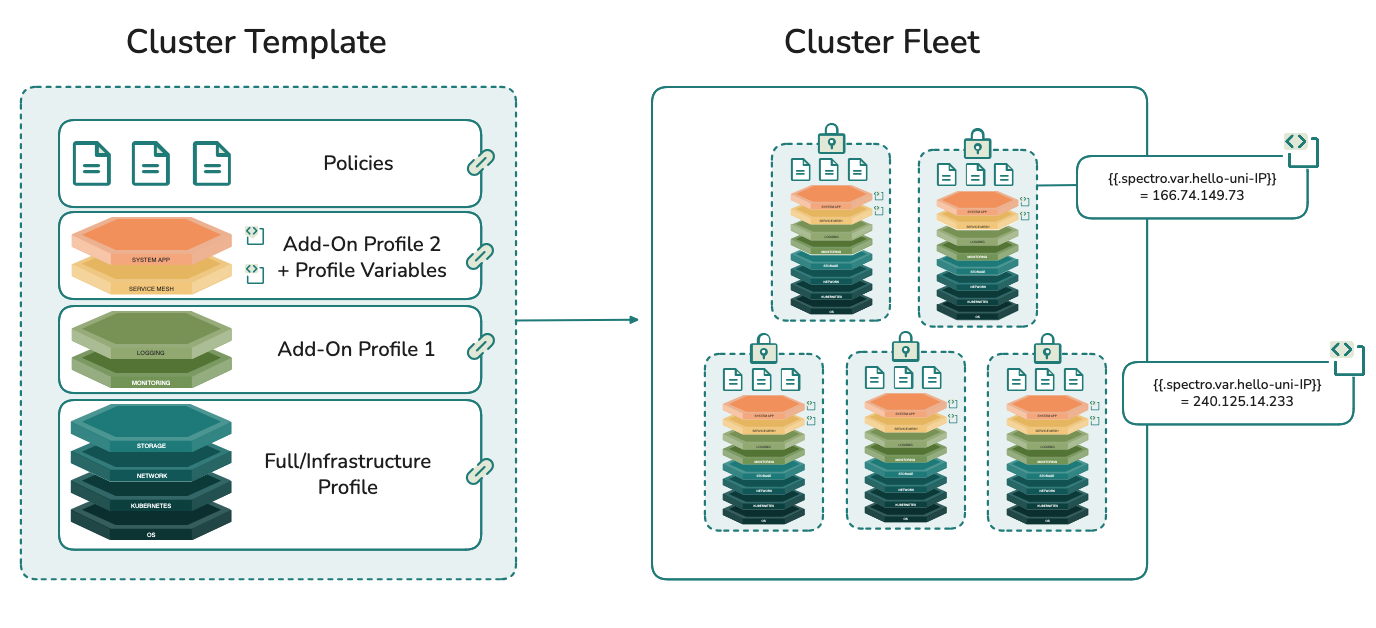
So that’s the basic concept. Now let’s look in a little more detail at the components and how they work together in a template.
Cluster Profiles: the foundation
As we’ve already covered, Cluster Profiles bundle the essential software layers your clusters need: operating system, Kubernetes, networking, and storage. They can also contain any application layers your workloads require: monitoring, logging, service meshes, and more, all of which can come in the form of packs, Helm charts, or custom manifests.
Whether you keep infrastructure and add-ons separate for separation of concerns, or combine them for simplicity, is entirely up to you.
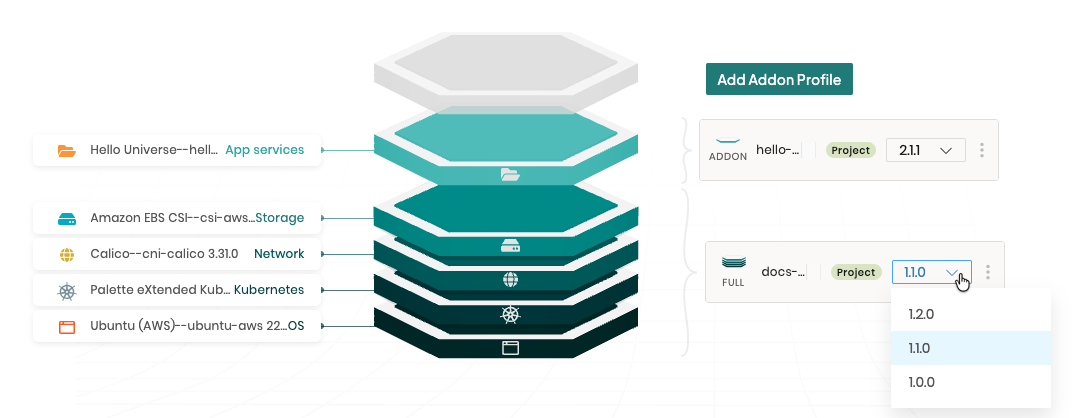
Profiles have built-in version control. When you need to update a pack, change a Kubernetes version, or swap layers entirely, you create a new version. This gives you an audit trail and rollback capabilities, and the confidence that no cluster changes unless you give the OK.
We've heard from customers operating hundreds or thousands of clusters that while they appreciate having total control over when each cluster updates, they'd also value the ability to automate operational tasks — like scheduling upgrades — and trust Palette to handle it. That's where templates come in.
When you attach a profile version to a template, that version is locked. Every cluster attached to the template gets exactly that configuration. When you’re ready to push changes, you increment the profile version, update the template, and let the platform orchestrate the rollout across your fleet.
Policies: the function
Policies are modular, reusable definitions that tell Palette how to manage your clusters. Policies are linked to rather than embedded within cluster templates, allowing you to update and swap policies independently.
Our plan is that we’ll offer many different types of policies for you to add to your templates: things like certificate management, proxy configuration, NTP settings, RBAC policies, and more. The goal is to make the template the operational source of truth for your entire fleet.
But we’re starting with one, really vital policy in this first release: maintenance policies.
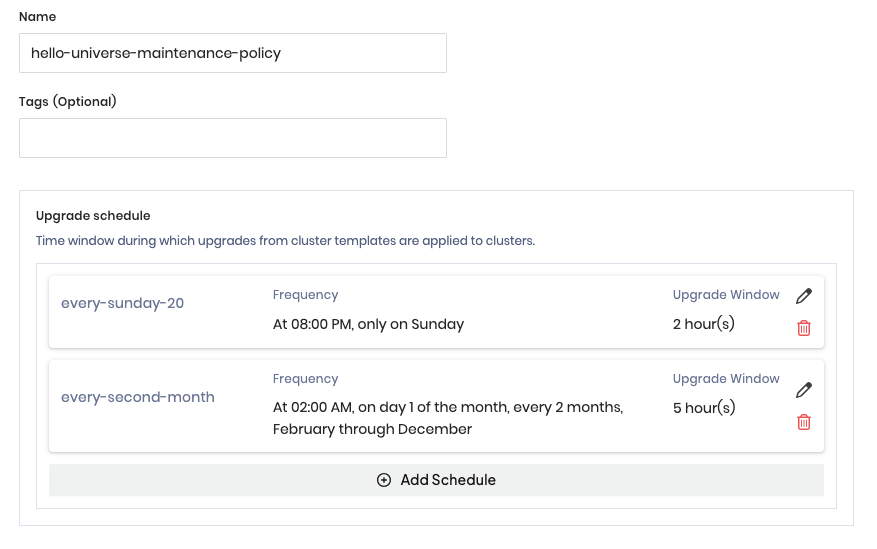
Maintenance policies control when and how upgrades are applied to your clusters. You can define upgrade windows and frequencies, so for example ensuring that clusters are updated at 2:00am every Sunday.
These windows are based on each cluster’s local time zone, so your global restaurant chain with 5,000 point-of-sale clusters gets updated at 2:00am in New York City, 2:00am in Berlin, and 2:00am in Tokyo. And while that happens, you’re in bed rather than slumped over the computer on your third cup of midnight coffee.
No change to the template? No update.
But it's not just scheduled maintenance. Kubernetes releases a new minor version every four months, with patch versions in between, and that's before you count CNI, CSI, and everything else in the stack. When a critical CVE drops, like the 9.8-severity Nginx vulnerability in May 2025 (or, heaven forbid, Shai-Hulud 3.0), you need patches ASAP. Maintenance policies account for these situations by allowing you to make one-time, on-demand updates. That way, when the doors open for business the next day, every location is patched and ready to go, no cluster left behind.
Variables: the flexibility
Cluster Profile variables are (optional) placeholders you define in your Cluster Profile's layer configurations. They’re handy for values that vary in otherwise reusable configurations: resource requirements, replica counts, IP ranges, or anything else.
You create the variable once in the profile, wrap it in {{.spectro.var.variable_name}} syntax, and then provide values when deploying each cluster. For example, if you’re deploying monitoring stacks to 50 clusters with varying storage needs, you create one profile with a storage_size variable instead of 50 different profiles.
The software stack stays identical; only that one parameter changes, and the human operator, when going through the steps of building a new cluster, is prompted for the value for each variable. Palette takes care of applying that value in each line of YAML that needs it.
Within templates, variable values can be updated at the individual cluster level — useful for tweaking a single cluster — or propagated across all clusters deployed with the same template, letting you push a fleet-wide change during the next maintenance window, without making cluster-by-cluster choices.
Better together
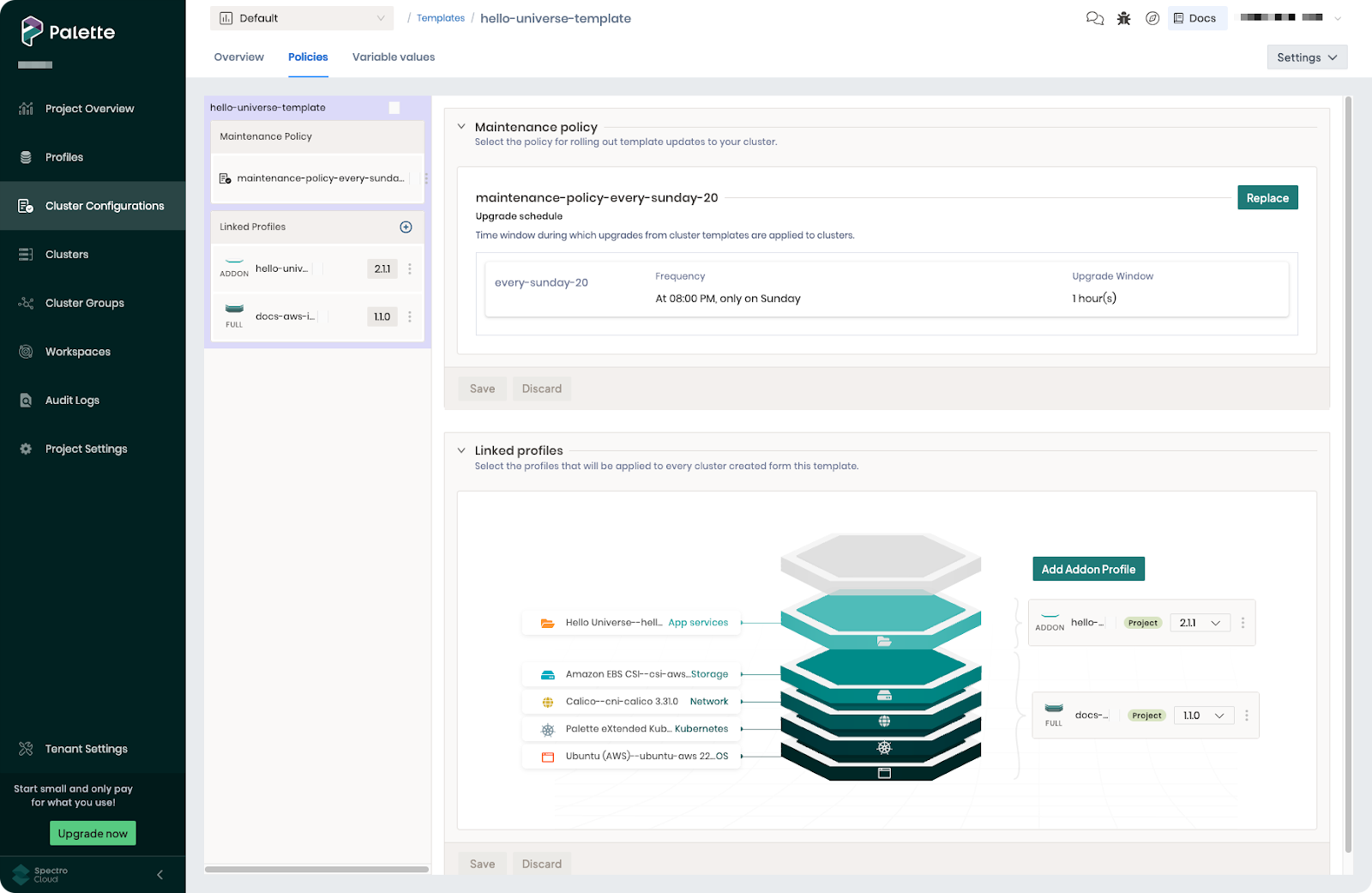
Cluster Templates combine profiles (software), policies (operations), and variables (flexible values) into one coherent system — one source of truth for what runs on your clusters, how they’re governed, and when they’re updated.
And creating them is straightforward: select one or more Cluster Profiles (with or without variables), define a maintenance policy, and link them to a template. That’s it. Fleet-wide governance in three steps.
What's next
Cluster Templates exited tech preview in Palette 4.8.21. While you can of course continue to use our ‘classic’ deployment workflow and build clusters directly from profiles, you’re now free to use a template for any new cluster deployments.
And that’s just the start. As well as adding many more types of policies, soon we’ll enable you to attach templates to your existing clusters.
If you're managing more than a handful of clusters, templates are a huge step forward in operational automation. The emergency midnight patches don't go away entirely, but when they come, you respond with a template update and let the system handle the coordination. That's the difference between managing infrastructure and governing it.
Take a look at our docs for an in-depth dive into how Cluster Templates work. Better yet, book a demo with us and let us show you what fleet management looks like in action.