
What on-prem AI means now
The first wave of enterprise generative AI was all about turning enthusiasm into action at speed. The most important thing was getting hands on tools fast, so hosted services were the obvious answer. A team could call a frontier model from Anthropic or OpenAI, or use a managed service such as Amazon Bedrock, without waiting for an AI server to arrive. That remains a sensible way to experiment. But as we have seen countless times over the decades, when a technology becomes critical business infrastructure, the familiar questions of governance guardrails, cost and control become unignorable — and just like with the trend towards cloud repatriation to on-prem, we’re starting to see a move towards on-premises AI, too.
Strictly speaking, on-premises AI means running models on hardware inside facilities your organization controls. In practice, enterprises often evaluate a wider set of private and dedicated options at the same time: an AI GPU server in your own data center, equipment in a colocation facility, reserved infrastructure in a sovereign or private cloud, and smaller systems at edge sites. The physical question is where the hardware sits. The economic and governance question is whether the capacity, data path and operating policies are under your control. Either distinction may matter, and often both do.
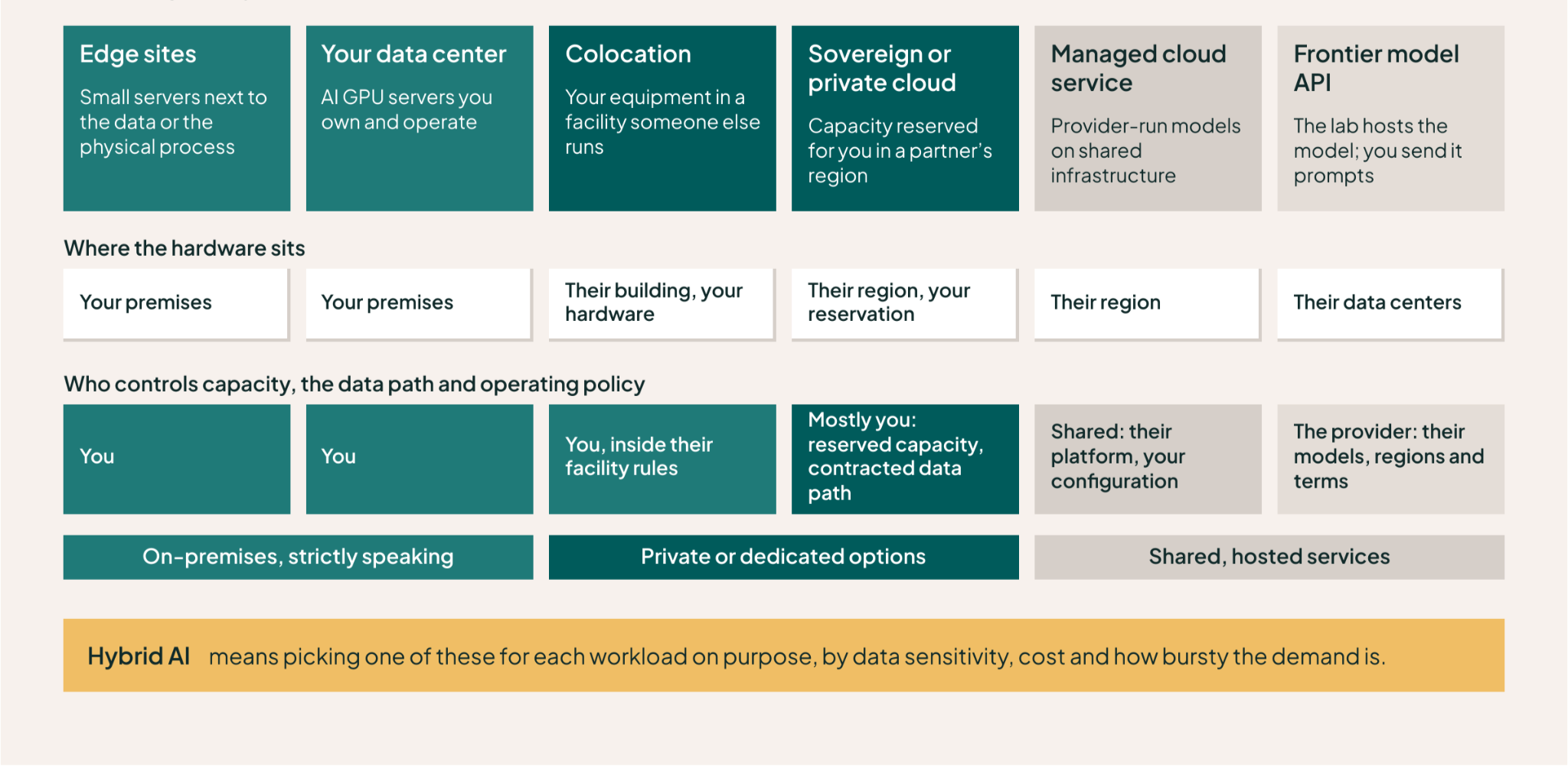
Of course, in the real world of the enterprise, not every AI workload is going to run in one place. Hybrid AI is a useful term here, giving a name to a strategy where inference tasks are deliberately assigned to a range of local, frontier or public cloud models to suit sensitivity, cost, and ‘bursty’ needs. Hybrid avoids a false choice between “all cloud” and “all on-prem.” The useful question is where each workload should run, for what reason, and under whose policy.
Four reasons why enterprises are bringing AI closer to home
1: Token prices are falling, but total spend keeps rising — fast
AI inference has become dramatically cheaper at the unit level. Stanford’s AI Index found that the cost of querying a model at roughly GPT-3.5 capability fell more than 280-fold between late 2022 and late 2024. Yet enterprise adoption is spreading from chat to coding agents, search, document processing and application workflows, where a single task may involve long context, tool calls and repeated attempts. A lower unit price can therefore sit alongside a rising total bill, as we explore in cheaper tokens can still produce bigger bills.
Consider an engineering team using agentic coding tools every day. At the standard Claude Sonnet 5 API rate of $3 per million input tokens and $15 per million output tokens, it is reasonable to budget $1,000–$2,000 or more per month for an agent-heavy developer. Not every developer will consume at that level, and subscriptions, caching and negotiated discounts will change the number. Across dozens of heavy users, though, the spend is large enough for an eight-GPU server to pay back in months rather than years (this was the driving force behind our latest product, the AMD Instinct Coder).
Every model has different cost per token and different token usage to complete the same task (as Lenovo’s 2026 TCO paper explores), which complicates the comparison. And running your own model locally comes with costs for power and cooling, support, staffing and idle time, as well as hardware costs. But in a common scenario we modeled, with a team of 30 concurrent developers working on GLM and a mix of local and frontier usage, we have proven up to 70% lower cost than frontier-only usage and payback in about six months. You can take a look at the calculation and the underlying assumptions in our AI inference TCO calculator.
2. Governance becomes an infrastructure decision
When prompts contain source code, customer records or regulated data, model placement affects more than latency and cost. You need to know where inputs and outputs are processed, what is retained, who can inspect the traffic, which jurisdiction applies and how an auditor can reconstruct a decision later.
Those requirements do not automatically mandate a server in your own building. A sovereign cloud, a dedicated hosted environment or a managed service with the right controls may meet them.
Even so, IDC’s survey of 1,015 infrastructure decision-makers found that most expected AI to span on-premise systems and public cloud, with data sovereignty among the reasons to operate infrastructure themselves. Governance is one of the reasons hybrid AI is becoming a planned architecture rather than an accidental collection of endpoints.
3. Some data should not make a round trip to the cloud
At a factory, hospital, store or mobile site, moving every camera frame, scan or sensor reading to a distant region can be slow, expensive or impossible during a network interruption. Running inference close to the data can shorten the response path, reduce upstream bandwidth and keep an application available when the connection is poor. This is the edge case for on-premise AI in the literal sense: the location of the compute is part of the application design.
We explored this use case in our State of Edge AI research a few months back — you can check out the findings here.
4. The latest open models give platform teams more room to choose
Frontier labs and managed cloud services decide which models, regions, versions and deployment controls they expose — and as we remember from the first days of Fable, models can be taken away just as easily as they’re launched.
Today’s open-license, open-weight models are astonishingly good, and once they’re out in the wild, they can’t be taken back. Some enterprises, like AT&T, have also had great success training their own models from scratch. Running open or proprietary models on dedicated AI hardware gives a platform team complete control over their own destiny, and the ability to experiment and optimize at their own pace, without disrupting the experience for their users.
Of course, it also expands the job for the platform team. Drivers, runtimes and models move quickly, and the team operating them has to test the combination as a complete stack, and tune the model serving environment to maximize performance for each model — or risk users grumbling that they don’t yet have access to the latest innovations.
The reality is that for many organizations, running a broad model portfolio enables users and workflows to pick the right tool for each job. Routine classification, extraction, summarization and coding tasks may run well on a small and efficient open model, while a frontier model remains available for work that needs its additional capability. The gateway (or router) between those destinations is therefore a key part of the local AI infrastructure, not an afterthought.
What kind of AI server do you need?
If these trends have convinced you to invest in on–prem AI, you’re gonna need a server.
The AI GPU server you need depends first on the models you want to run and how much accelerator memory they require. Then you have to allow for the number of simultaneous users, context length, throughput and enough headroom for the workload to change. The exact model that a mixed group of users will need three years from now is unknowable, so we suggest you size against a small set of credible scenarios rather than a single perfect forecast.
An eight-GPU server can do useful work for a substantial team. Teams can use this class of system for local coding models and other high-concurrency inference. AMD Instinct Coder, for example, combines eight AMD Instinct MI325X GPUs with 2+ TB of HBM3e memory and is designed for up to 50 developers, including 30 concurrent users. There are eight-GPU options from AMD and NVIDIA across Supermicro, Dell and other vendors, as well as smaller two- and four-GPU systems. And that’s before you get to the desktop-class “personal AI” appliances like AMD’s Halo or DGX Spark, which can also form a credible part of your on-prem AI infrastructure mix. Different accelerator families and generations vary sharply in memory, performance, price, software compatibility and availability.
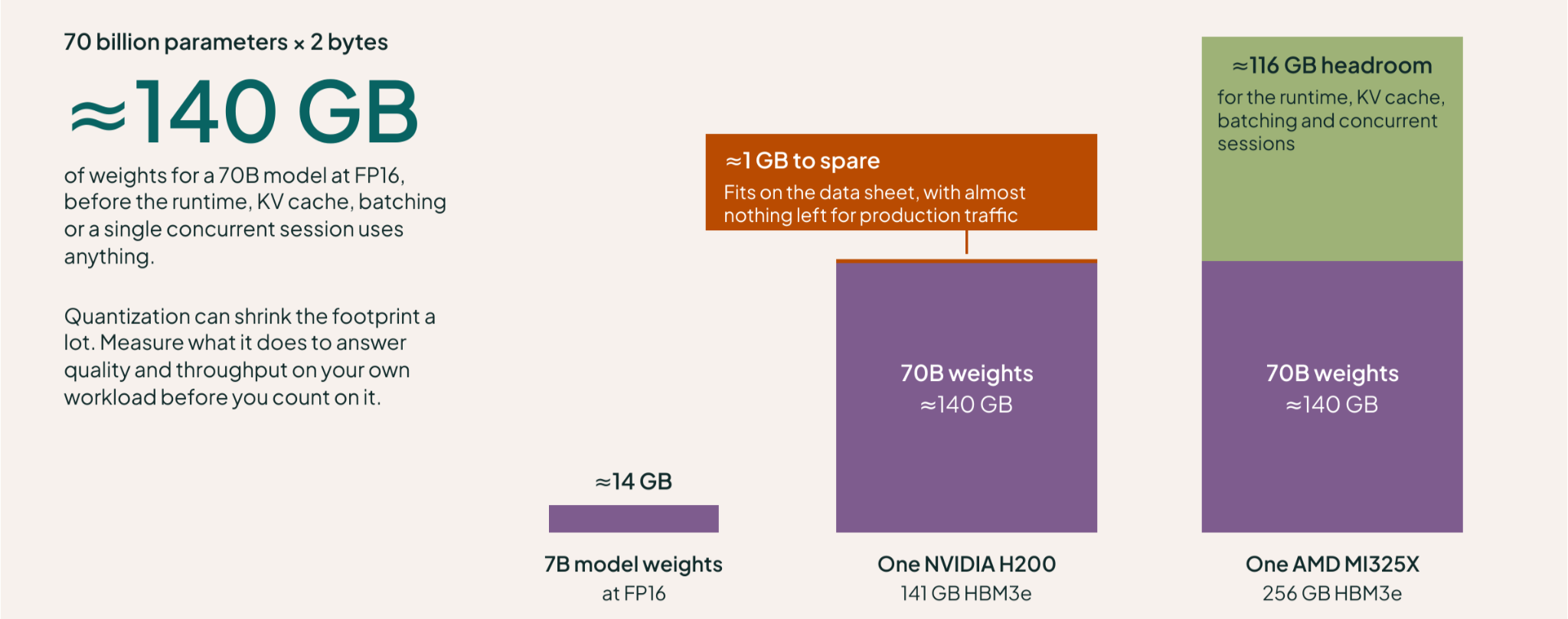
The memory arithmetic explains the range. At FP16, model weights need roughly two bytes per parameter, so a 70-billion-parameter model requires about 140 GB before the runtime, KV cache, batching or concurrent sessions use anything. One NVIDIA H200 has 141 GB of HBM3e, while one AMD MI325X has 256 GB. A model that fits on a data sheet may still leave too little room for production traffic. Quantization can reduce the footprint substantially, but its effect on answer quality and throughput needs to be measured on your workload.
Don’t neglect smaller models for real work
Model quality is improving at sizes that are much easier to run. An NVIDIA Research position paper estimates that serving a 7B model can use 10–30 times less compute and energy than serving a 70B–175B model, with similarly large latency improvements. The authors estimate that specialized small models could handle 40–70% of calls in the agent systems they studied. Those percentages are a design estimate rather than production telemetry, but the underlying advice is sound: test whether a smaller model can do the job before buying infrastructure for a larger one.
For each representative workload, benchmark a smaller specialist model, a mid-sized general model and the largest model you can justify. Measure task quality alongside latency, throughput and memory use on the serving stack you plan to operate. Keep explicit headroom for growth, then revisit the mix as models improve. The result is a plan that can evolve instead of relying on today’s favorite model for the whole investment period.
AI server prices vary by hundreds of thousands of dollars
Lenovo’s published 2026 configurations give a useful sense of the spread:
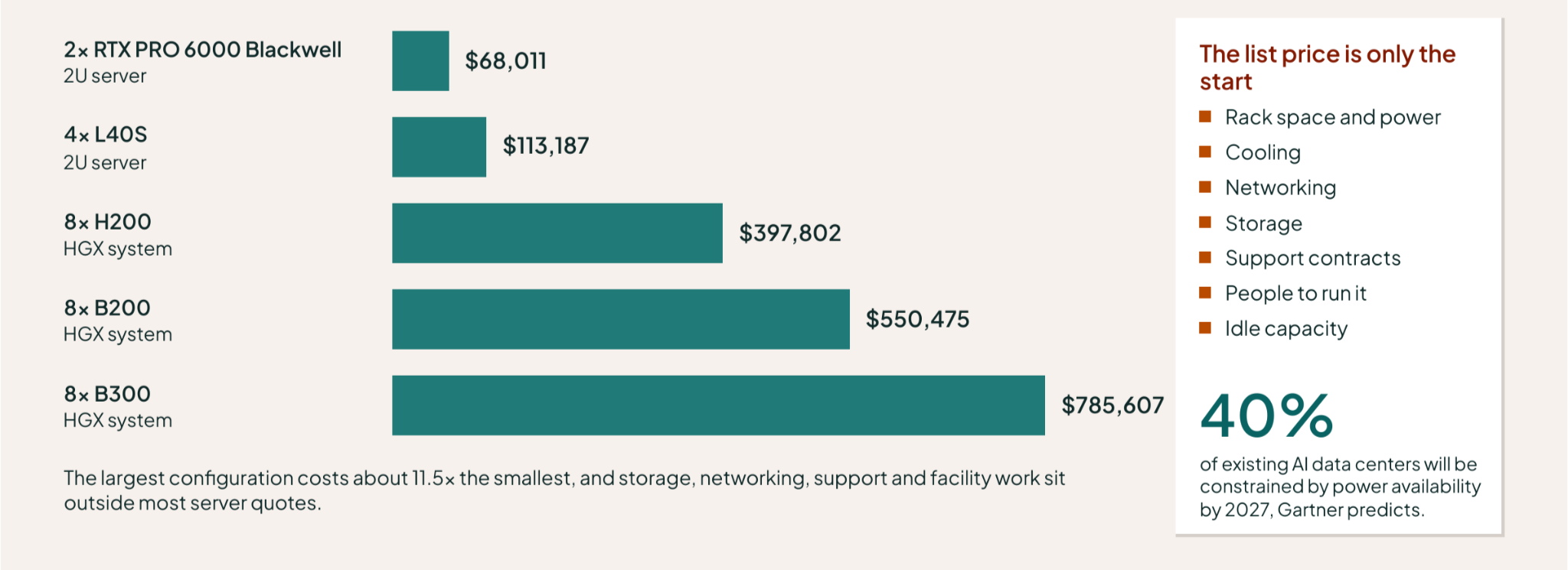
- 2× RTX PRO 6000 Blackwell in 2U: $68,011
- 4× L40S in 2U: $113,187
- 8× H200 in an HGX system: $397,802
- 8× B200 in an HGX system: $550,475
- 8× B300 in an HGX system: $785,607
Of course these are representative Lenovo examples, not a complete market map. Dell’s PowerEdge AI range includes systems for edge inference through to eight-GPU servers with NVIDIA, AMD or Intel accelerators. Supermicro offers a similarly broad portfolio; its air-cooled 8U AS-8126GS-TNMR supports eight AMD Instinct MI325X or MI350X GPUs. Starting configurations and full production quotes are not directly comparable, but the variety matters when price and delivery dates can change the shortlist.
The server quote is only the start
So you’ve scoped the size of server you think you’ll need and you know the list price. The list price covers only part of the project. As we hinted at above, you still need rack space, power, cooling, networking, storage, support and people who can operate the system. A configuration that works on paper can fail the facilities review because the chosen rack cannot supply enough power or reject enough heat.
Gartner predicts that 40% of existing AI data centers will be constrained by power availability by 2027, while IDC says commissioning schedules are increasingly governed by utility capacity. Procurement cannot solve a facility problem, and another server cannot solve an allocation problem.
But don’t automatically assume that investing in on-prem AI infrastructure requires exotic facilities. The Supermicro system we used for AMD Instinct Coder is an air-cooled 8U server. Other high-density designs use direct liquid cooling to fit more compute into less space or reduce facility energy use, but GPU count alone does not mandate it.
Availability may change the configuration
Demand for AI hardware is another part of the design. Dell reported a $95 billion backlog for AI servers at the end of its latest quarter and said memory remained the primary supply constraint. That is strong evidence that the market is hot, but it also has a practical consequence for buyers: a preferred accelerator or system may not be available on the timetable the business needs.
If your frontier-model bill is increasing every month, waiting nine months for a first-choice on-prem configuration has a real cost. A validated second choice that is available sooner may produce a better three-year outcome. Availability should broaden the shortlist, within limits: benchmark more than one AMD and NVIDIA option, check the software support matrix, and plan for a fleet that may contain several hardware generations.
Best practices for on-premise AI
Buying your own AI hardware vs using a cloud or frontier service improves your overall cost model only if the platform turns that hardware into a reliable, shared service. Utilization is vitally important, but it sits alongside isolation, routing, observability, lifecycle management and capacity planning. These decisions belong in the business case before the purchase order is signed.
Measure useful GPU work, not a single utilization percentage
An average GPU utilization number can hide more than it reveals. A device may be allocated but idle, busy with a low-value job, short of memory, or waiting because the other GPUs needed for a distributed task are scattered across the cluster. You should track allocation, active compute, memory pressure, queue time, tokens per second, request latency and cost per successful task to get the complete picture. Add workload and team labels so you can see where capacity is producing value and where it is simply reserved.
Lenovo’s eight-B200 scenario illustrates how sensitive the economics can be. In that model, owning becomes cheaper than AWS On-Demand at 5.3 full-node-equivalent hours per day over five years. That’s just one comparison, with one configuration and one set of assumptions, rather than a universal threshold. Your crossover will move with electricity, staffing, financing, useful hardware life, cloud discounts and the shape of demand. The discipline is to expose those variables and keep updating them with real usage.
Share capacity without giving up isolation
Dedicated AI servers often become expensive islands because the access model is decided informally: one team gets a whole GPU, a notebook keeps it overnight, and larger jobs wait even though usable capacity exists elsewhere. A shared service needs an explicit request path, quotas and a scheduler that understands accelerator topology. Gang scheduling prevents a distributed job from occupying half the devices it needs, while bin packing can reduce fragmentation.
Isolation matters just as much. Separate tenants through identities, namespaces and network policy; apply hardware partitioning or time-slicing only where the accelerator and workload support it; and make preemption rules visible before a queue becomes contentious. NVIDIA MIG is one useful option on supported GPUs, but it is one implementation inside a broader multi-tenant design. The result should let a team request the capacity it needs without inheriting control of the server.
Make the model gateway and observability layer part of the platform
A production on-premise AI service needs a stable entry point between applications and models. That’s called a gateway or smart model router, and there are lots of them out there!
The gateway authenticates each client, applies routing policy and records what happened. It can keep sensitive requests on a local model, send an approved task to a frontier endpoint, or fail closed when external access is forbidden. It should also enforce quotas, meter tokens and dollars, and expose a clear audit trail.
Routing only works when it is paired with observability. Platform teams need latency, error rate, queue depth and cost by client and model. They also need signals for response quality, fallback frequency and policy violations; otherwise a “cheaper” route can degrade the application without anyone noticing.
Our view is that model routers are only half a solution: the local serving stack, identity, policy, metering and operational dashboards have to work together.

Manage the whole AI stack as a lifecycle
Your shiny new local AI server will outlive several versions of its operating system, Kubernetes distribution, accelerator drivers, operators, inference runtime and models. Updating one layer without testing the rest is a reliable way to create config drift.
For years we’ve been banging the drum that you should use a versioned, declarative profile for the whole stack, promote changes through a representative test environment, and keep a rollback path that includes bare-metal recovery.
Our classified AI factory work shows why this belongs in the plan. A federal integrator had spent ten months hand-configuring an NVIDIA HGX and Spectrum-X environment. Using PaletteAI, the team deployed the platform in 30 days, later rebuilt it from bare metal to apply a patch, and added HGX nodes within days. This is our own case study, but we’re sharing it here because it shows how powerful it can be when you can redeploy from a blueprint with confidence.
Plan capacity with scenarios and leave room to change course
AI demand is unlikely to settle into a forecast that stays accurate for three years. Build low, expected and high scenarios from current usage instead. For each one, model the mix of local and frontier requests, user concurrency, memory pressure, service-level targets and the lead time for another node. Revisit those scenarios as usage and model quality change.
Scale-out plans should assume some hardware diversity. A later purchase may bring a different GPU generation or vendor because it offers better economics or is the only validated system available on time. Standardizing the operating process, model APIs, policy layer and telemetry reduces the cost of that diversity without pretending the underlying accelerators are identical.
Edge sites are a special case
The logic for edge AI as an on-prem AI deployment model starts with the application rather than a data-center TCO comparison. A medical scanner may need a result while the patient is still in the room. A production line cannot wait for telemetry to make a round trip to a distant region before rejecting a defective part. A store may generate far more security cam video than it makes sense to upload for motion detection or face recognition. In each case, local inference is valuable because the data, decision and physical process are in the same place.
That changes the hardware and operating assumptions. Edge AI servers like those from SNUC or HPE are often smaller and optimized for power, space or environmental limits. They may also need to keep working through poor connectivity. At the same time, every site needs a consistent operating system, Kubernetes layer, security policy, model-serving runtime and update process. The engineers responsible for them may be hundreds of miles away.
Our State of Edge AI research found that only 11% of respondents had reached full-scale edge AI production, while 42% had stopped projects that never progressed beyond a pilot. A one-device demonstration leaves the fleet problem unsolved: the real challenge of edge AI is deploying, securing, updating and recovering the system without the cost of dispatching an engineer to every location.
A practical way to plan an on-premise AI deployment
- Start with current work, not a perfect forecast. Inventory applications, agentic users, token bills, data classifications and latency requirements. Separate steady demand from bursts and experiments.
- Build several model scenarios. Choose representative small, medium and large models, then estimate concurrency and headroom for each. Include the local-to-frontier routing mix rather than assuming every request will stay on-premise.
- Benchmark candidate AI hardware. Test at least two viable AMD or NVIDIA configurations with the serving runtime you plan to operate. Measure quality, latency, throughput, memory use and power under realistic concurrency.
- Compare the full economics. Put frontier APIs, managed cloud services and owned or dedicated infrastructure on the same time horizon. Include facilities, networking, support, staffing, financing, idle capacity and the expected refresh cycle.
- Design the operating model before delivery. Define access, quotas, isolation, scheduling, model routing, observability, upgrades and recovery. Confirm that the facility and supply timetable support the chosen configuration.
- Pilot one production workload, then update the plan. A measured pilot will tell you more about model fit and utilization than another round of spreadsheet precision.
If coding agents are driving your bill, the Spectro Cloud AI inference TCO calculator can help you compare local and frontier scenarios. PaletteAI Inference Launchpad provides a validated local-first stack for AMD or NVIDIA AI servers, including model serving, intelligent routing, metering and day-two operations.
On-premise AI is attracting attention again because production has changed the balance of cost, control and data locality, even though public cloud and frontier models still have an important role. In our view, private AI hardware works best when its role is chosen deliberately, its use is measured and the software around it receives the same care as the silicon.
On-premise AI FAQ
Isn’t it ‘on premises’?!
Absolutely! The language nerds in our team get twitchy when someone says ‘on premise’: a premise is a foundational assumption; a premises is a building or facility, and that’s the correct meaning here. But we’re trying to catch some search traffic with this article — please forgive us sprinkling in ‘on premise’ and ‘on prem’ throughout.
What is on-premise AI?
On-premise AI means running AI models on infrastructure your organization controls in its own facilities. Enterprise evaluations often include a broader set of private or dedicated options, such as colocation, sovereign cloud and edge sites. The common thread is greater control over capacity, data paths and operating policy.
Is on-premise AI cheaper than frontier APIs or public cloud?
It can be, especially for sustained inference and heavy agentic use. A power user can plausibly consume $1,000–$2,000 per month under consumption pricing, and Spectro Cloud’s modeled 50-developer scenario shows payback in about six months for an eight-GPU AMD system with mixed local and frontier usage. The result still depends on utilization, model quality, staffing, facilities and commercial terms. Public cloud remains useful for experiments, bursts and uncertain demand.
How much does an AI server cost?
Current published examples range from about $68,000 for a two-GPU server to nearly $786,000 for an eight-GPU flagship system. Lenovo, Dell, Supermicro and other vendors offer different configurations across AMD, NVIDIA and Intel accelerators. Storage, networking, support and facility work sit outside many server quotes.
What AI GPU server do I need for LLM inference?
Start with model memory and then account for concurrency, context length, runtime overhead and growth. An eight-GPU server is a practical starting point for a team that needs large models or high concurrency; AMD Instinct Coder supports up to 50 developers and 30 concurrent users on one node. Smaller models and lighter workloads may fit comfortably on two or four GPUs. Benchmark representative work before committing.
Do eight-GPU AI servers need liquid cooling?
No. Some dense systems use direct liquid cooling, while the eight-GPU Supermicro server used for AMD Instinct Coder is air-cooled. Choose the cooling design from the exact server specification, rack density and facility limits rather than GPU count alone.
Why does an on-premise AI platform need a model gateway?
Quite simply, the gateway becomes the control point and governance layer for your organization to get complete visibility into all the AI operations your teams are doing. The gateway is also where admin policies are enforced, to decide which request are routed where. It can authenticate clients, route requests by policy, enforce quotas, meter cost, record an audit trail and fail closed when external access is prohibited. Paired with observability, it lets the platform team compare cost, latency and quality instead of treating model choice as an invisible application detail.
Is edge AI the same as on-premise AI?
Edge AI is a special form of local deployment in which compute runs close to the data or physical process. Its priorities are often latency, resilience and bandwidth rather than data-center economics. The hardware may be smaller, but operating hundreds or thousands of remote sites turns deployment, security and recovery into a fleet-management problem.