









.jpg)
Tech companies are (in)famous for having a “move fast and break things” attitude. Whatever industry you work in, you’ve probably felt the pressure to copy the startup bro culture in your IT organization: deliver value at breakneck speed, use all the latest technologies … and figure out how to make things sustainable and secure later.
But the world always has a way of bringing security back to center stage. Recently, the Shai Hulud 2.0 supply chain attack harvested credentials, exfiltrated data, and propagated itself to over 180 NPM packages. Organizations had to scan their codebases for vulnerabilities, rotate their credentials, and remediate vulnerabilities at record-breaking speed.
And if your organization had neglected to implement security controls from the beginning… well, they’ll have found the remediation actions were far from straightforward.
Tracking down credentials and implementing dependency scans during an incident can mean the difference between timely remediation and a complete data leak. After this happens, rolling out updates can genuinely feel like closing the barn door after the horse has bolted.
Incidents like Shai Hulud show why it’s so important to rely on partners and software vendors with a robust security posture, and understand what tools you can leverage for your own security policies.
In this blog post, we’ll show why our Palette management platform is a great example, exploring the mechanisms Palette provides for resource isolation and user access, which are core considerations for customers seeking to deliver innovation without sacrificing security and resilience.
Core concept: multitenant architectures
Multi-tenancy simply means that multiple groups of users share a single instance of a running application.
Technically speaking, a tenant is a logical representation of a user that shares an application with others while remaining isolated for data, configuration, and access. In reality, ‘tenants’ might be business units in an enterprise sharing an internal developer platform, or they might be millions of consumer customers sharing access to Gmail or YouTube.
The important thing is how tenants are kept separate from one another. Tenant separation is enforced through user authentication, access control, and application-level data isolation.
There are advantages and disadvantages to multi-tenant architectures. You should understand and consider these when choosing which software you choose to use.
Of course, the concept of multitenancy is what enabled SaaS to take off as it did back in the day, and the benefits are still compelling to many enterprises: there’s no dedicated instance to install or manage, and everyone benefits from economies of scale.
It’s important to underline that multi-tenant architectures are not inherently prone to security risks or performance issues. Some of the most critical services operate on this model. For example, AWS and most of its services that power the modern Internet are multi-tenant.
When multitenant architectures don’t fit
Regardless of how trusted (and convenient) multitenant platforms can be, depending on your business requirements, you may need other options. For example, if you have compliance obligations such as data sovereignty, or even if you just want to be in full control of when your software’s maintenance windows occur, you might rule out multi-tenant SaaS in your business. You might also need to run software in places that aren’t connected to the public internet, and therefore can’t reach SaaS platforms at all.
These considerations are why it is essential to find a software vendor that can support you, no matter your requirements. For example, Spectro Cloud’s Palette provides three deployment options:
- Multi-tenant SaaS: The management plane runs in a public cloud and is managed by Spectro Cloud, which is responsible for platform upgrades and maintenance. We offer instances in the EU and in the US.
- Dedicated SaaS: Deploy a dedicated instance of Palette to your chosen cloud and region. Spectro Cloud manages the platform, but you decide when to perform upgrades.
- Self-hosted: You install and manage an instance of Palette on your own infrastructure. You have complete control of your environment, but you are responsible for upgrades.
For the record, about half of Spectro Cloud’s customers have a dedicated SaaS instance or operate their own self-hosted Palette installations, as these deployment options best suit their organizational models.
Regulatory requirements around multi-tenancy apply not just to where the Palette management plane itself is hosted, but also to where your workloads are hosted. Palette provides AWS cluster deployment to dedicated hosts, which are physical servers with EC2 instance capacity fully dedicated to your use. These advanced capabilities are continually added to Palette to meet customer needs.
It’s isolation all the way down: Palette Tenants and Projects
In a multi-tenant system, resource isolation ensures that each tenant accesses only their own data, uses their fair share of resources, and cannot degrade the performance of other tenants.
Resource isolation in Palette is centred around two scopes:
- Tenant scope ensures that all resources are displayed to the correct tenant. This scope ensures that information is shown only to the tenant it belongs to.
- Project scope offers a more granular level of organization, helping you logically group clusters and cluster resources. The resources created within a project are scoped to that project and are not available to other projects.
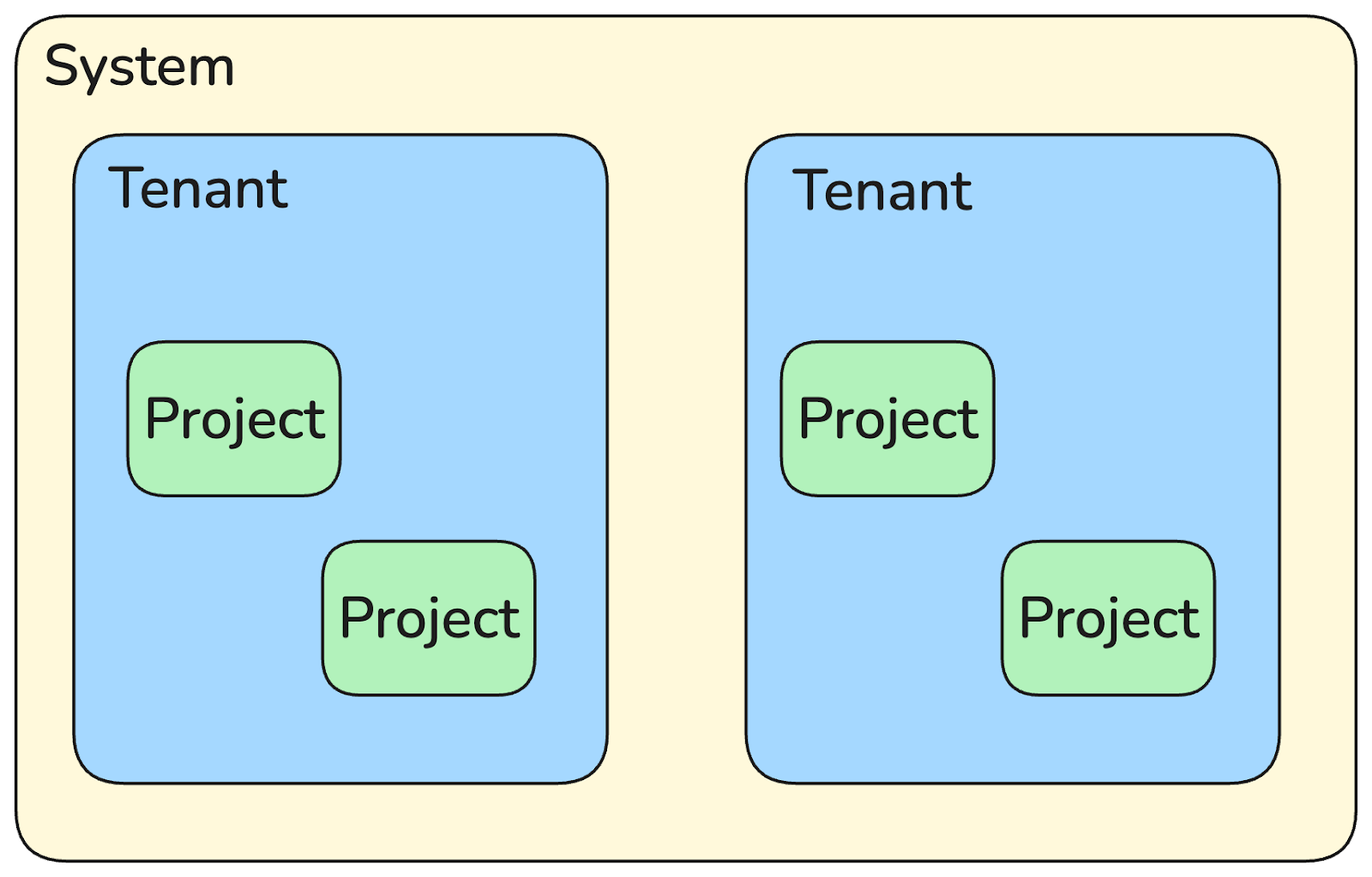
The following diagram depicts the organization of these scopes. It is important to note that our ‘dedicated’ and self-hosted Palette installations also have access to tenant scopes, because ‘tenant’ doesn’t just mean ‘Spectro Cloud customer’.
Tenant and project scopes make it easier to enforce complete separation across large organizations or installations that are shared across environments: you might treat each business unit as its own tenant, for example.
Controlling who does what: user permissions and RBAC
Tenant and project scopes are enforced not only on Palette resources but also on user permissions. This is where Palette’s scope separation truly shines, providing granular user privileges across projects rather than just within tenants.
For example, let’s say an organization has a single tenant that is shared by two engineering teams. Each team can only access and modify resources in their own project, while the IT team is the only team with tenant-level privileges to make system-wide changes.
All actions in Palette are controlled by our robust permission model, which provides fine-grained access controls across the platform. At the core of this model are roles and permissions. Permissions define who can access different Palette components, while roles group those permissions. Finally, roles are assigned to users or teams.
Each Palette component, such as clusters or cluster profiles, is represented by a unique resource key and a defined set of operations that can be performed on that resource. Permissions are tied directly to these resource keys and operations, ensuring explicit, predictable access.
Palette provides granular, secure access to platform resources through Role-Based Access Control (RBAC). With RBAC, users and teams can have different levels of access depending on the resource and scope involved. These capabilities ensure that users have only the permissions they need to perform their responsibilities.
RBAC in Palette emphasises assigning permissions to roles rather than directly to users or teams. Users and teams can be assigned multiple roles, allowing their permissions to be a combination of all assigned roles. This approach offers flexibility while maintaining clarity and control, making it easier to manage access as organizations and teams grow.
Security from the user’s perspective
Let’s look at these concepts in practice to understand better how to configure user roles. Consider a scenario where the engineering team has several new employees they want to onboard efficiently. For the sake of this example, we will assume that the team has not yet implemented robust RBAC controls.
First, you will need someone with access to make tenant scope changes. This teammate could be a senior or DevOps team member. Select the Tenant Admin project from the project dropdown list, and the Users & Teams navbar item appears. We always recommend creating teams to implement scalable and maintainable user access controls. You can create a new team from the Teams tab. Based on the scenario we are discussing, the engineering team creates a new Engineering Onboarding team to which they can add team members who are not yet familiar with Kubernetes or Palette.
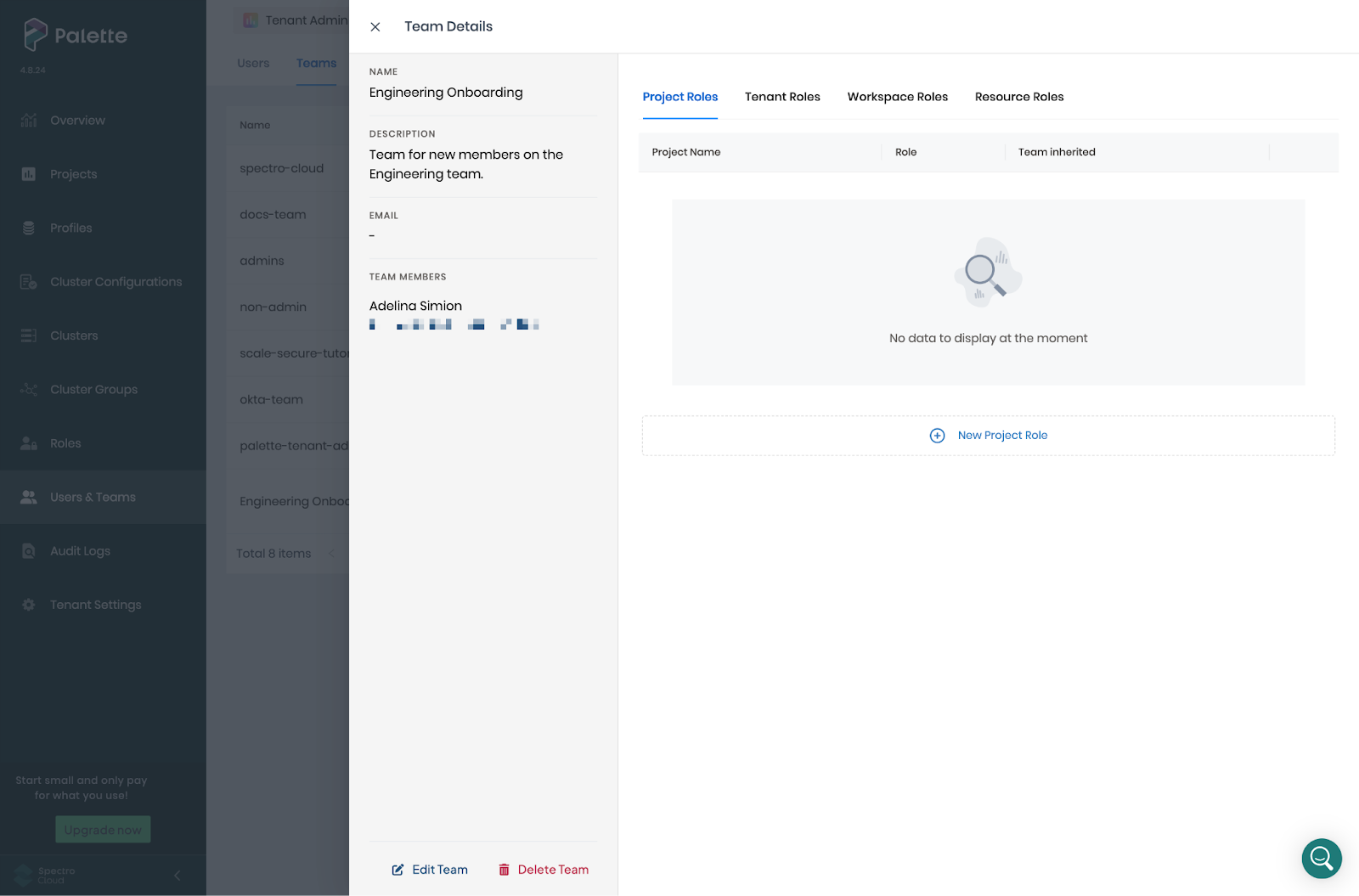
Now that the team is created, we can assign roles to ensure new teammates can perform all operations relevant to their job function. Palette provides extensive lists of tenant, project, and resource roles. These built-in roles make it easy for all Palette admins to grant permissions to their team members without having to configure everything from scratch.
Users can be members of multiple teams, allowing them to combine roles according to their organizational requirements. If permissions contradict between teams, the highest level of permissions is applied. For example, if you are a member of a team that grants you admin privileges and another team that grants you only view permissions, then the combination of the two teams will result in admin privileges.
Based on the scenario we are discussing, the Engineering Onboarding team should have Cluster Profile Admin and Cluster Admin roles in the Default project, but only the Cluster Profile View and Cluster View roles in the Demo project, which may contain sensitive workloads.
Granting roles according to the principle of least privilege is a security best practice. Still, it also prevents new colleagues from causing outages or making changes they may not yet understand. This level of separation can be a huge relief to nervous new teammates who just want to experiment and learn in peace. 😅
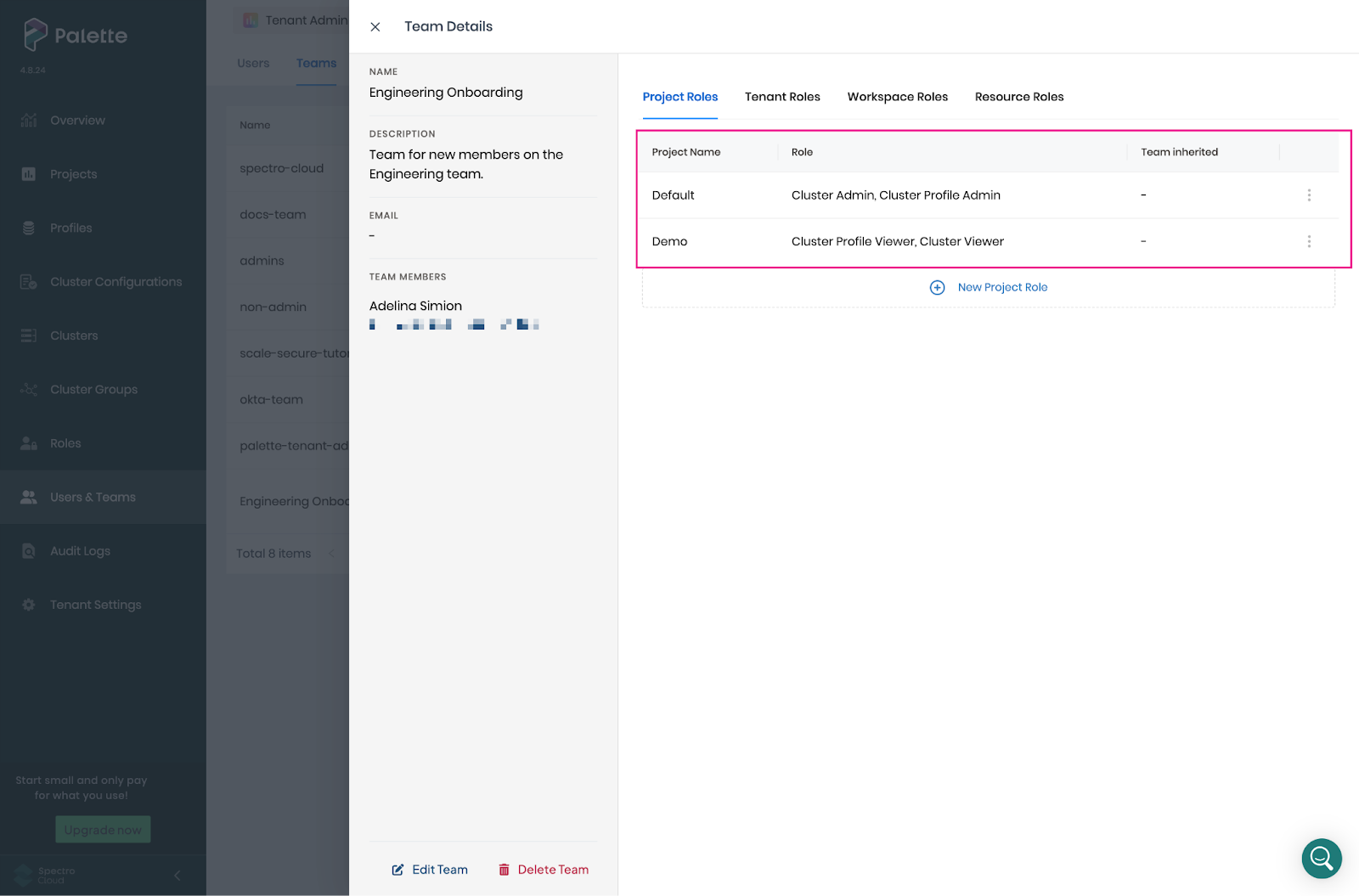
Once the team is created and the roles are assigned, onboarding new employees is as effortless as adding them to the team. 🥳 This single-step setup ensures everyone has the access they need from day one, while allowing team admins to enforce consistent controls across the entire team.
Updates are just as effortless. Admins adjust the team roles, and the changes apply automatically to all members.
Palette makes security second nature
This blog has only scratched the surface of Palette's security capabilities, exploring how resource isolation and user access controls work together to provide a secure foundation, even in multi-tenant architectures.
Tenants and projects let you organize your resources to mirror your team and company structure, making it easier to enforce resource isolation in multi-tenant environments. However, the power of Palette projects isn’t limited only to resource grouping! They can also give you precise control of who can access what, allowing you to configure and enforce user permissions at the project scope.
Palette is designed to adapt to the way you work. Tenant administrators can create custom roles that group permissions to support their unique workflows, rather than being limited to predefined access patterns.
For even finer control, Palette supports Attribute-Based Access Control (ABAC) through custom resource filters and resource roles, letting you apply permissions based on specific attributes and enabling more granular, dynamic access policies. With ABAC, you can enforce stricter, context-aware controls that extend beyond what built-in roles alone can offer.
Finally, Palette also supports Single Sign-On (SSO) with a variety of Identity Providers (IDPs), including Okta and Microsoft Entra ID. By relying on trusted identity platforms for authentication, Palette removes the burden of password management from users and significantly reduces the risk of credential exposure.
If this blog has sparked your interest and you want to try Palette, contact us for a quick 1:1 demo to explore how Palette can simplify security while scaling with your organization.