
About six months ago at NVIDIA GTC in Washington DC, we unveiled PaletteAI for the first time. In March, at GTC San Jose, we declared general availability alongside an expanded ecosystem, with solutions from partners like Aviz, 6WIND, ClearML, ConfidentialMind, F5, WEKA, and NVIDIA AI Enterprise embedded directly into the PaletteAI experience.
Now, just two months after GA, our first point release ships. PaletteAI 1.1.0 brings 92 feature enhancements and 152 bug fixes across seven major initiatives. That's a lot of work for a ‘minor’ release, and it's almost entirely driven by feedback from customers like you. Here are the highlights.
Keeping pace with AI: faster, more flexible deployment
How quickly you can deploy and scale new AI tooling is a direct contributor to ROI. The frameworks, models and partner tools your teams use today won't be the same ones they're using in six months — AI is moving fast, and the platform underneath has to keep up. After GA, customers asked us to make adding, updating and iterating on tooling faster, and to make it easier for partners and internal teams to contribute new tools to the platform. 1.1 acts on all of that.
Profile Bundles level up
The biggest of those changes is to Profile Bundles. You can now import them as a tarball directly from the PaletteAI UI. Open the Profile Bundles page in your Project, drop in a .zip, .tar.gz or .tgz archive (up to 100 MB), and PaletteAI scans it, previews the detected bundle (name, version, type, description, tags, hardware requirements), and imports it. No CLI required.
We've simplified the publishing process too. The fewer hoops between a working tool and a deployable PaletteAI bundle, the easier it is for our partner ecosystem and your internal platform teams to contribute new tools to the catalog — which means more tools in front of your AI practitioners, faster. Filtering and consistency across the UI have also tightened up, so bundle behavior is predictable wherever it appears: the App Deployment wizard, Compute Pool creation, the bundle list view and the bundle drawer.
When it comes to actually provisioning a complex configuration, our goal is to get you to ‘works first time’. So we’ve now added the ability to do ‘dry runs’. The new paletteai dry-run command validates schema and references locally, either online against a cluster or completely offline. Catching a schema error before it hits a GPU node saves you the 30-45 minutes a provision-and-teardown cycle normally costs.
Importing, cloning and mirroring
Sometimes it’s quicker to copy than to start from scratch, so we’ve expanded ‘cloning’. Tenant admins can now clone a Project to stand up a new one from a known-good baseline, without rebuilding settings, integrations and access. Operators can clone a custom Model Deployment from its view page, which is handy for iterating on a deployment configuration. Operators can also clone a specific version of a Workload Profile, branching from a working starting point.
For sovereign-cloud and air-gapped deployments, the new mirror command makes staging container images and Packs into disconnected sites a supported CLI workflow:
- mirror export downloads chart and images to a local bundle directory
- mirror push uploads a previously exported bundle to an internal OCI registry
- mirror sync runs export and push in a single command
The paletteai studio import command also accepts relative paths now, supports infrastructure add-on imports, and populates bundle tags, annotations, logo and deletionPolicy at import time, so imported bundles arrive with their metadata intact.
Multi-tenancy controls for AI factories and sovereign clouds
When you're running an AI factory, a sovereign cloud, or any large enterprise AI environment, multi-tenancy is the operational reality. You're sharing scarce, expensive infrastructure across teams, business units, and sometimes external customers. The bigger your environment gets, the more critical it becomes for everyone to operate within their own guardrails.
PaletteAI 1.1 introduces new controls that make that practical at scale, starting with the concept of tenants. Before, every Project in PaletteAI had to be configured independently. Now, from the new Tenant Settings page, you can define configuration once at the tenant level and share it with selected Projects. Integrations like HuggingFace and NVIDIA, model defaults, OIDC group access, scaling policies, GPU limits, Compute Configs and Model as a Service Mappings: all managed centrally. You can lock a setting to prevent Project-level overrides, or leave it open so individual Projects can customize where it makes sense. A new Tenant Overview page brings Projects, compute footprint and policy posture into a single dashboard view.
GPU governance now works the same way. PaletteAI tracks GPU reservations at the tenant scope and supports per-Project GPU limits with oversubscription tracking. Tenant-scoped and Project-scoped Compute Pools draw from separately delimited pools, so one team's burst stays clear of another team's production workload. New admission rules let tenant admins govern which namespaces workloads can be created on shared spoke clusters.
There are also new controls for what your end users see in the platform. Cluster admins can gate which Compute Pool options appear in the App Deployment and Model Deployment wizards through eight new feature flags. If your organization requires all Compute Pools to be provisioned through a separate, governed workflow, you can now enforce that in the UI.
Permission Groups also get more flexible. You can edit existing groups directly and filter OIDC connectors, making it easier to keep PaletteAI access in sync with your identity provider as it changes.
Driving hardware utilization with visibility and autoscaling
GPUs are the single most expensive line item in any AI infrastructure budget. PaletteAI was built with utilization as a core value — shared GPU pools, intelligent scheduling, namespace quotas — and our customers consistently see a sharp jump in GPU utilization once they migrate to it. 1.1 advances that story with new visibility and a more flexible autoscaling model.
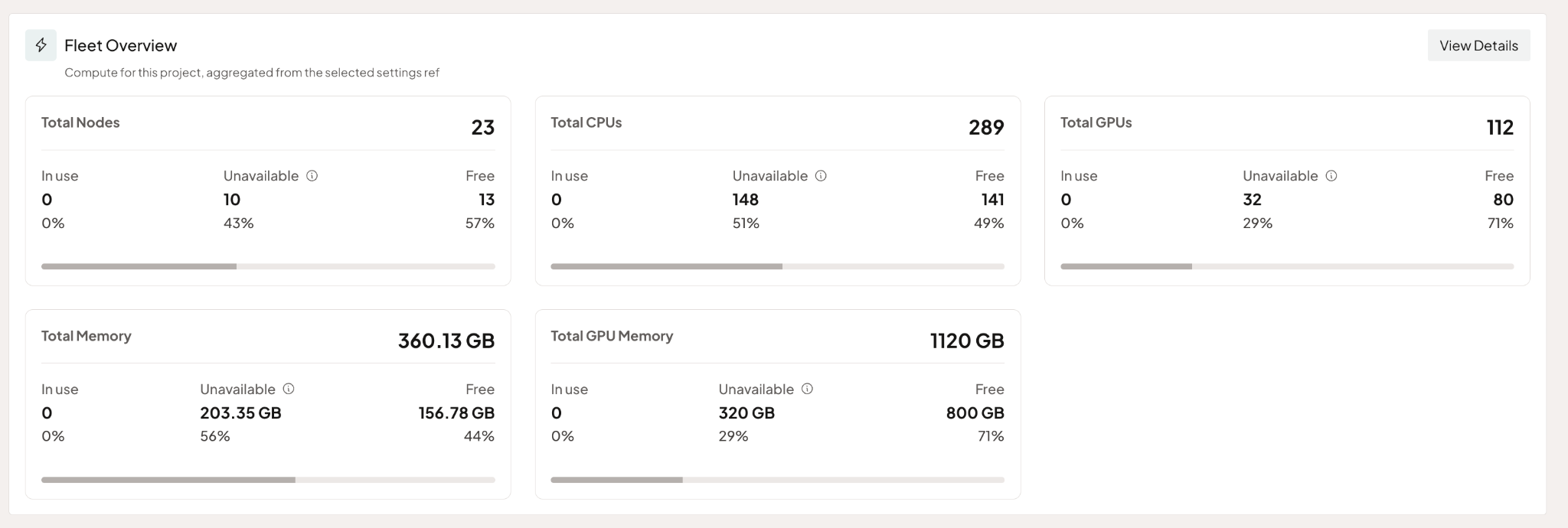
We've significantly rebuilt the Fleet Overview in this release. You now get visibility into available and in-use CPU, GPU, memory and node counts at project or tenant scope, plus detailed node-level allocation. The views are adjustable, so you see what you actually need rather than what we think you need.
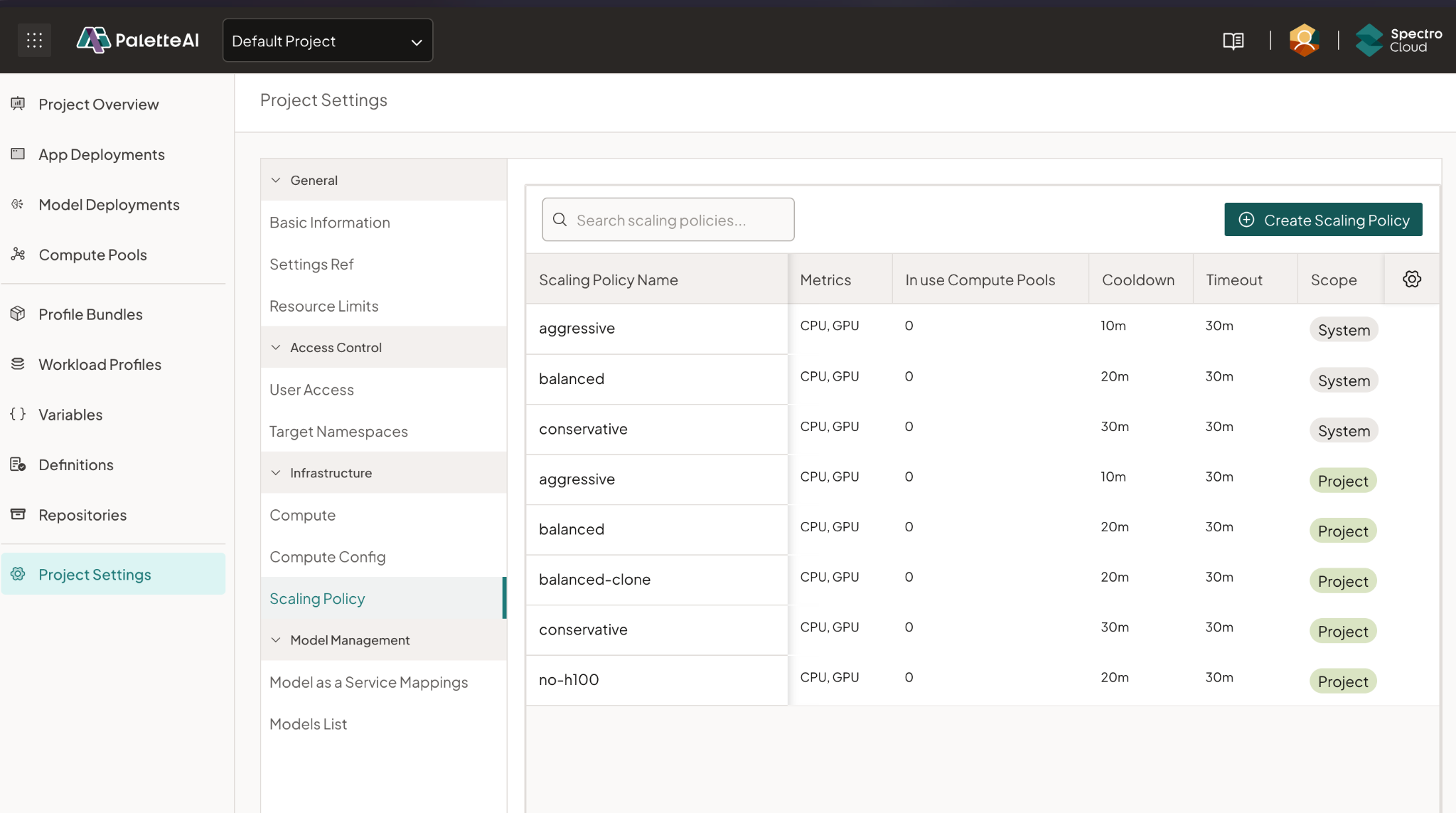
While PaletteAI has supported autoscaling since GA through predefined policies, real-world use cases demand more flexibility and customization.
With this release, you can now create and manage autoscaling policies at both the tenant and project level, aligning scaling behavior with specific workload requirements, cost objectives, and operational constraints.
Tenant-level policies can be shared across multiple projects, ensuring consistency, while still allowing teams to clone and customize policies as needed. Users also gain full control to edit or delete policies within their scope.
This level of flexibility enables enterprises to move beyond one-size-fits-all scaling and adopt tailored resource management strategies, improving GPU utilization, reducing costs, and ensuring that AI workloads scale efficiently in multi-tenant environments.
A growing partner ecosystem
When we GA'd, our expanded partner ecosystem announcement covered Aviz, 6WIND, ClearML and ConfidentialMind, F5, WEKA and many more. The ecosystem keeps growing. Three additions stand out in 1.1.
NVIDIA AI-Q. Palette and PaletteAI are the foundation of an end-to-end ML infrastructure that helps from the very beginning, with bare metal provisioning, all the way to deploying and managing NVIDIA AI-Q in production. Instead of wrestling with manual setups and brittle configurations, teams can
- Deploy AIQ faster using reusable, validated cluster profiles
- Standardize environments across clouds, data centers, and edge locations
- Automate lifecycle management, including upgrades and policy enforcement
- Gain visibility and control over GPU-enabled clusters at scale
We've published a dedicated post on the PaletteAI–AI-Q integration with the technical detail — check it out here for the full picture.
n8n. PaletteAI Studio now ships with n8n, an open-source workflow automation platform with more than 187,000 GitHub stars. You can visually design workflows that connect APIs, applications and AI services — a great fit if you're starting to put agentic AI patterns into production and want to build workflows spanning multiple AI services and business systems without writing connector code from scratch.
Aviz Networks. With 1.1, our Aviz integration is production-ready. Together, PaletteAI and Aviz give you network isolation policies for multi-tenant AI environments, so different teams, customers or business units operate within their own isolated network segments. It pairs neatly with the tenant-level governance you'll see elsewhere in 1.1.
Why this all matters
When we launched PaletteAI at GTC DC, our pitch was direct: production AI is a system, and it works when platform teams and AI practitioners both get what they need from it. GA was the first time we delivered that complete system to general customers.
Now with PaletteAI 1.1, we’re evolving to give you more of what you need on the front lines of AI: speed of innovation combined with consistency and control at enterprise scale.
If you're an existing customer, the release notes have the full picture, and you can log in to update your environment. If you're not a customer yet and you'd like to see PaletteAI in action, book a demo with one of our experts. And if you're starting to think about how PaletteAI fits into a broader AI infrastructure strategy, the Why Spectro Cloud for AI page is a good place to start.