
Deploying multi-tenant AI infrastructure is hard enough to get right in production. Doing it wrong is expensive: tenant traffic leaks, GPU allocation conflicts, and isolation failures are discovered after the fact — all on hardware that took months to procure. The harder question most teams face is how to validate that a complex multi-tenancy design actually works before committing to it at scale.
NVIDIA DSX Air was built to answer that question. It's a cloud-hosted infrastructure simulation platform that creates full-stack digital twins of AI data center environments — switches, servers, operating systems, and network configurations — all running in a browser without any physical hardware. At GTC 2026, NVIDIA is positioning DSX Air squarely within the AI Grid and AI factory narrative: it's the validation layer that lets teams design, test, and break things (!) safely before production deployments go live.
This blog covers how Spectro Cloud PaletteAI, Aviz ONES, and NVIDIA Spectrum-X Ethernet work together to deliver multi-tenant AI infrastructure — and how NVIDIA DSX Air gives teams a sandbox to verify that the architecture holds up before they deploy it for real. We'll also look at a concrete example of Red/Blue network isolation tested end-to-end in DSX Air.
Of course, it’s important to note that the tooling stack we’re showing in this blog is just one possible option. NVIDIA’s goal with Air is to foster a whole ecosystem of partners. Network configuration is achievable via Armada, Aviz, BE Networks and Netris; host configuration can be performed via platforms other than Spectro Cloud PaletteAI.
Why multi-tenancy matters for AI infrastructure
Most enterprise AI factories aren't single-tenant. They serve multiple teams, projects, business units, or in the case of sovereign AI clouds and telco AI Grid deployments, multiple external customers. Each of those tenants needs its own slice of compute, its own traffic isolation, and its own policy boundaries — without any of that complexity becoming a bottleneck for the platform teams managing the fabric.
Multi-tenancy for AI infrastructure operates at several layers simultaneously. Access control assigns role-based permissions so tenants can only see and use their own resources. Logical isolation separates traffic flows, typically through Kubernetes-level isolation for workloads and VLAN/VNI separation at the network layer. Resource segmentation allocates compute, storage, and network bandwidth without interference between tenants. And policy enforcement applies security and compliance rules on a per-tenant basis, which matters especially for regulated industries and government workloads.
When these layers work together, the benefits are significant:
- Resource efficiency. Shared compute, storage, and networking maximize utilization and cut operational costs compared to dedicated per-tenant infrastructure.
- Operational scalability. New tenants, resources, and workloads can be added incrementally as AI projects grow, without rebuilding the architecture each time.
- Strong isolation. Workloads, data, and traffic are separated across all layers of the stack, supporting compliance requirements and preventing cross-tenant interference.
- Simplified management. Centralized orchestration with policy-based controls across tenants replaces the manual runbooks that tend to accumulate in siloed environments.
The challenge is that achieving all of this across the full stack — from orchestration down to the network fabric — requires the orchestration layer and the fabric control layer to stay in sync. When they're managed separately, the gap between them becomes a source of misconfiguration, security risk, and slow tenant provisioning.
How PaletteAI, Aviz ONES, and Spectrum-X Ethernet fit together
The integration that Spectro Cloud and Aviz have built closes that gap programmatically. The idea is a clean separation of concerns: PaletteAI owns application and compute lifecycle, Aviz ONES owns fabric and node-level control, and NVIDIA Spectrum-X Ethernet provides the high-performance fabric underneath. Each layer does its job without the others needing to reach into it.
PaletteAI: orchestration from bare metal to model
PaletteAI manages the full AI workload lifecycle — provisioning Kubernetes clusters (called compute pools), enforcing GPU quotas, managing tenant and project access, and providing data science teams with self-service GPU environments. Platform administrators define the policies; data scientists deploy within them. A data scientist doesn't need to know how to configure a compute pool or a network fabric — they just see available resources and deploy models.
The platform is organized into tenants, which are top-level organizational containers that let platform teams centrally manage access, policies, infrastructure, and resources across groups. Within each tenant, projects give teams their own workspace, controlled access, and dedicated resources for AI/ML workloads.
Aviz ONES: programmatic fabric control
NVIDIA Spectrum-X Ethernet is purpose-built for AI factory workloads: an Ethernet fabric that provides predictable bandwidth per tenant for the east-west GPU traffic that training and inference both depend on. But fabric configuration and orchestration don't talk to each other by default. When a platform team creates a new compute pool in PaletteAI, the Spectrum-X Ethernet fabric doesn't automatically know which physical nodes belong to that tenant, which VLANs to apply, or which QoS policy to enforce.
Aviz ONES is the control plane that bridges that gap. It exposes a REST API northbound so PaletteAI can drive fabric changes programmatically — creating tenants, allocating GPU nodes by hostname, and decommissioning tenants when projects wind down. Southbound, Aviz ONES pushes configuration to Spectrum-X Ethernet switches. The result is that a pool creation in PaletteAI triggers an automatic, auditable chain of fabric configuration changes through Aviz ONES, without any manual intervention from a network administrator.
The integration follows a straightforward flow. PaletteAI exposes compute pools and attaches a tenant label (such as palette.ai/aviztenant = Red) when a pool is created. That label ties the pool to a specific Aviz tenant, which drives the corresponding logical node group assignment and fabric isolation on Spectrum-X. The same hostnames used in PaletteAI for cluster provisioning are used by Aviz ONES for fabric tenant allocation, creating a single consistent node registry across both systems.
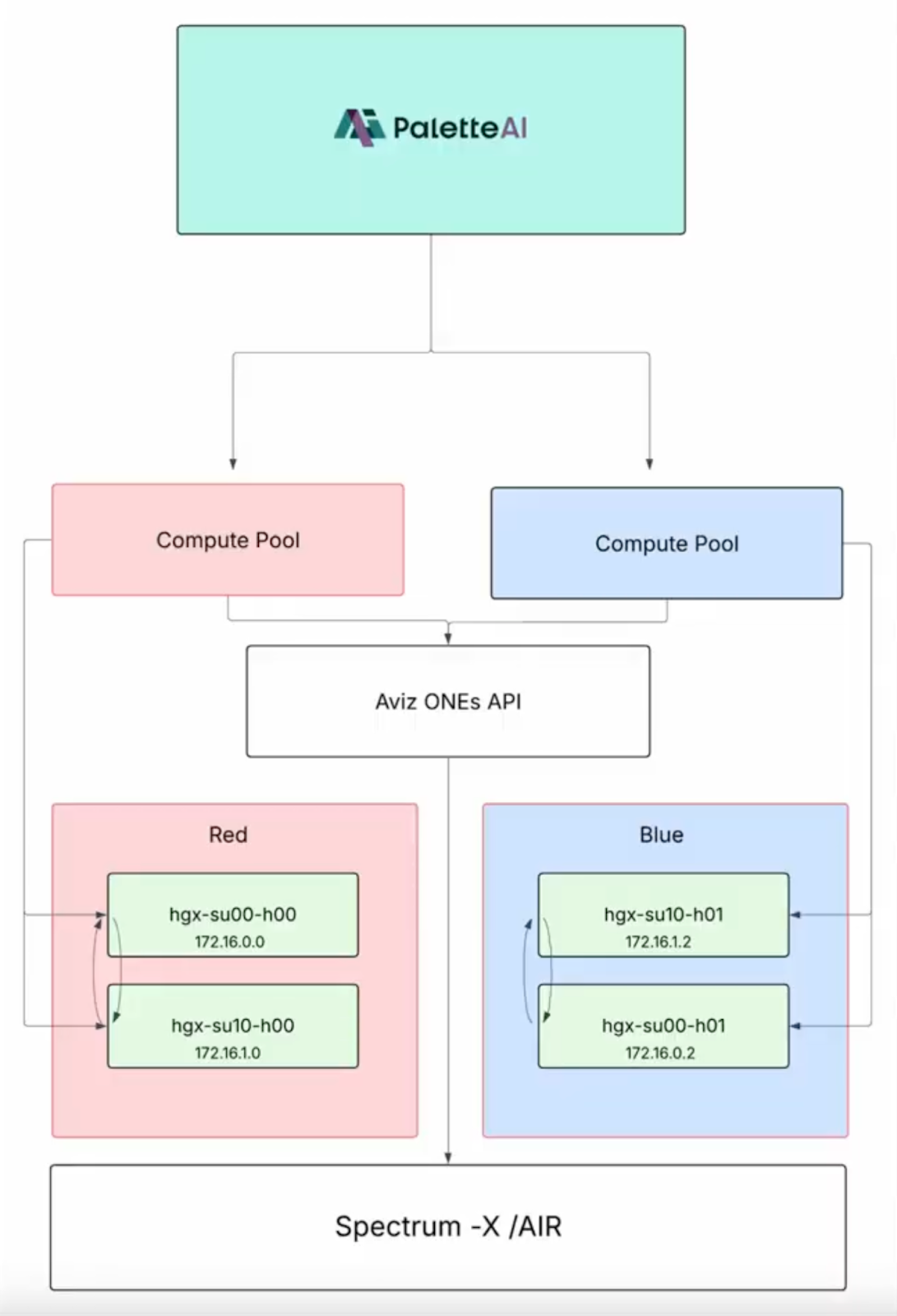
Figure 1. PaletteAI compute pools mapped to logical node groups (Red/Blue) through Aviz ONES, with fabric isolation enforced on NVIDIA Spectrum-X/DSX Air.
Where NVIDIA Air fits in
NVIDIA DSX Air is a cloud-hosted simulation platform that builds 1:1 digital twins of AI data center infrastructure. Unlike a staging environment or a proof-of-concept rack, DSX Air runs entirely in the cloud — no hardware required. It supports simulation of NVIDIA Spectrum-X Ethernet switches running Cumulus Linux or SONiC, NVIDIA BlueField DPUs, Connect-X SuperNICs, and x86 servers with full OS and application stacks. Topologies can scale to thousands of switches and servers, and simulations can be shared across teams for collaborative testing and training.
For the particular PaletteAI/Aviz ONES/Spectrum-X architecture we’re using as an example in this blog, DSX Air serves as the validation environment. Before a team creates a new tenant design in production, they can stand up the equivalent topology in DSX Air, apply the Aviz ONES-driven isolation configuration, and verify that it behaves correctly — that nodes within a tenant can reach each other and that cross-tenant traffic is blocked at the fabric level. When new nodes need to be added, or a tenant configuration needs to change, those changes can be validated in DSX Air first, which significantly reduces the risk of fabric misconfigurations reaching production.
At scale, this matters even more. Production AI factories with dozens of tenants and hundreds of nodes have too many interdependencies to safely test changes on live infrastructure. DSX Air provides the risk-free environment where those changes can be staged, broken intentionally, and fixed — before any production traffic is affected. NVIDIA includes DSX Air in its AI factory design guidance precisely because design-time validation pays off disproportionately for complex multi-tenant fabrics.
A concrete example: Red/Blue isolation testing in DSX Air
The best way to understand how this works is to walk through a real test scenario. The setup uses four NVIDIA HGX nodes on a Spectrum-X Ethernet fabric, split into two logical groups: Red (hgx-su00-h00 and hgx-su10-h00) and Blue (hgx-su00-h01 and hgx-su10-h01). Before any isolation is applied, all four nodes can reach each other — full connectivity across the fabric, confirmed by a ping sweep from any node.
With the baseline confirmed, the first step is to configure network isolation in PaletteAI. In project settings, under Network Isolation, selecting Aviz triggers the Aviz configuration section, where teams enter the endpoint URL for the Aviz ONES API, a fabric name, and an API key. Aviz tenants — Red and Blue — are defined here and will map directly to compute pools.
Creating the Red pool follows a standard PaletteAI wizard, with one critical addition: in the metadata labels section, the label palette.ai/aviztenant = Red is applied. This is what binds the pool to the Aviz tenant and tells Aviz ONES which nodes to assign to the Red logical group on the fabric. Once the pool reaches Running status, the isolation test can run.
From a node inside the Red tenant — say, hgx-su00-h00 — pinging the other Red node (hgx-su10-h00) succeeds with zero packet loss. Pinging either Blue node results in 100% packet loss. The nodes that aren't in the same tenant are unreachable, exactly as intended. The Red pool is then deleted, the Blue pool is created with palette.ai/aviztenant = Blue, and the same test confirms isolation in both directions.
The key point isn't just that the isolation works; it's that the isolation is configured automatically. No one edits a switch configuration manually. The label on the PaletteAI compute pool drives the Aviz ONES API call, which pushes the SONiC fabric configuration to the Spectrum-X Ethernet switches. And the entire sequence can be run in DSX Air before a single physical node is provisioned.
Designing for production
A few considerations are worth calling out for teams taking this architecture toward production deployments.
- Node naming and IP consistency. The same hostnames must be used in both PaletteAI and Aviz ONES. Since Aviz ONES allocates and deallocates nodes by hostname, any mismatch between the Palette node registry and the Aviz node registry will cause provisioning failures that are hard to debug. Setting up a consistent naming convention before the first tenant is created saves a lot of troubleshooting later.
- Lifecycle coordination. When a compute pool is resized or deleted, the corresponding Aviz ONES tenant update needs to happen in sync. Specifically, GPUs should be deallocated via the Aviz ONES API before or alongside the PaletteAI pool deletion — the API typically requires a tenant to have no allocated GPUs before it can be removed. This is worth building into runbooks and automation from the start.
- Validate before scaling. The Red/Blue test above uses two pools and four nodes. The same pattern scales to many tenants and many nodes, with Aviz ONES node groups aligned to physical or logical boundaries like rack, row, or availability zone. But each scaling step is also an opportunity for misalignment to creep in. Running NVIDIA DSX Air simulations before adding tenants or expanding node groups keeps that risk manageable.
- Control plane availability. For production use, PaletteAI and Aviz ONES control planes each need high-availability configurations with documented failover procedures. Pool and fabric operations need to stay consistent during failures — an unplanned control plane outage that leaves fabric tenants in a partially configured state is difficult to recover from without that documentation.
Bringing it together
Enterprise AI factories almost always need multi-tenancy. Whether the use case is a sovereign AI cloud serving multiple organizations, a telco AI Grid serving business customers, or an internal platform supporting multiple teams and compliance zones, the requirement to share infrastructure securely and efficiently is nearly universal. The complexity comes from making the orchestration layer and the fabric layer move together.
The integration of PaletteAI, Aviz ONES, and NVIDIA Spectrum-X Ethernet addresses that directly. PaletteAI handles application and compute lifecycle with self-service access for AI teams. Aviz ONES translates orchestration intent into Spectrum-X fabric configuration through open APIs, keeping pools and fabric tenants aligned without manual reconciliation. And NVIDIA DSX Air provides the ecosystem-wide simulation environment to validate that the architecture works as designed… before production infrastructure is touched.
For teams looking to reduce the risk and lead time of deploying multi-tenant AI infrastructure, this combination offers a practical path: design the topology, validate it in DSX Air, and deploy with confidence.
Join the webinar
Spectro Cloud and Aviz are hosting a joint webinar diving deeper into the particular architecture we’ve covered in this blog — including a live demonstration of using DSX Air for this simulation workflow, the PaletteAI and Aviz ONES integration, and Q&A with the engineering teams. Whether you're evaluating multi-tenant AI infrastructure for the first time or looking to validate an existing design, this is a good opportunity to see the end-to-end flow in practice.