










We have a lot of conversations with organizations of all shapes and sizes that are looking for a modern home for their VM estate.
Generally nowadays the people we’re talking to have heard of KubeVirt, they know you can run VMs on a Kubernetes stack, and they believe that this cloud-native, open-source approach is the right way to go (especially since it lays the foundation for unifying how VMs and containers can run together).
But. Plenty of teams have looked at that path and loved everything about it except the on-ramp. Standing up Kubernetes, KubeVirt, storage, networking and access control, configuring a separate management platform, all before you can boot a single VM… it’s a real project, and you didn't ask for a project. You asked for somewhere to run your VMs. Ideally ready yesterday.
That’s why we built Launchpad for VMs, which GAd this week. It’s a pre-built, pre-validated software appliance for running VMs and containers on Kubernetes. It ships as a bootable ISO, runs on bare metal, and requires no external dependencies. No internet connectivity, no separate management platform, no assembly. Boot it, walk through the cluster creation wizard, and start migrating VMs.
An appliance with no asterisks
Of course, appliances and their advantages aren't a new idea. There are even some other appliances for KubeVirt out there from our esteemed competitors. It’s appealing to have the “bootable ISO” experience where everything you need to install is all just there.
But run one of those appliances standalone, in production, and you hit the asterisks. Single sign-on? That lives in the vendor's central management platform. Role-based access control? Management platform. More than one user? You can guess.
To be clear, central management platforms are a fine thing (we sell a rather good one). They belong in your architecture when you have a fleet to manage. They shouldn't be the price of admission for running one rack securely.
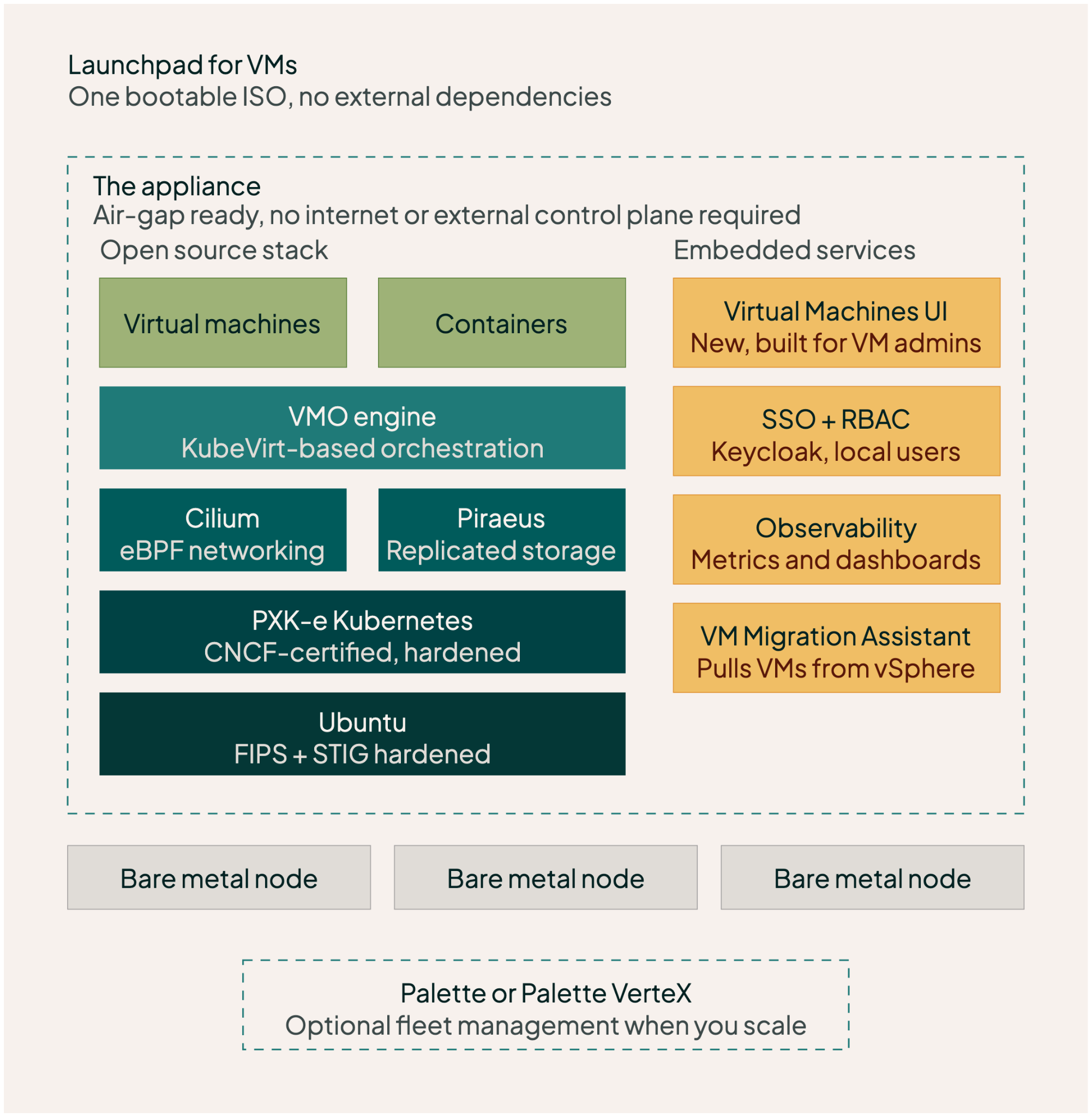
Launchpad for VMs is, as far as we can tell, the first fully self-sufficient enterprise VM appliance built on Kubernetes and KubeVirt. Everything an enterprise needs to operate VMs day to day is embedded in the appliance itself:
- A brand new Virtual Machines UI, designed to be familiar to VM admins, not for K8s ninjas. It’s very pretty.
- Embedded SSO authentication, RBAC, IAM roles and local user management
- Full VM lifecycle management: start, stop, pause, snapshots with retention, golden images and live migration
- The VM Migration Assistant bundled in, for moving VMs off VMware vSphere 7.0 and 8.0 through a web UI
- Embedded observability, with metrics and dashboards you can use locally or pipe into your enterprise monitoring platform
- Container workloads running alongside your VMs, managed through Headlamp
- Full air-gap support out of the box
- A FIPS-hardened stack from the operating system through Kubernetes, networking and storage
Under the hood it's a carefully chosen open source stack. CNCF-certified hardened upstream Kubernetes. Cilium for eBPF-based networking. Piraeus (LINSTOR) for replicated storage across the cluster. Keycloak for SSO.
Every component is open, swappable in principle, and free of proprietary lock-in — which matters rather a lot if lock-in is the thing you're currently escaping.
And a special note for the airgap and FIPS bullet points. Those last two items mean you can run this appliance disconnected in a classified environment, with no phone-home and no external auth service… and that means it will handle your data center just fine, without you having to go beg your network and security teams for firewall exceptions.
The same engine, proven in production
We should probably emphasise at this point that the Launchpad is not some totally new stack that we’ve baked just for this appliance delivery model. Launchpad for VMs runs the same Spectro Cloud Virtual Machine Orchestrator (VMO) engine that many enterprises have already trusted for their production VMs on Kubernetes for a few years now: the same KubeVirt-based runtime, the same migration tooling, the same operational patterns, packaged as a new deployment model. What's new is how little you need before you can use it.
Getting started looks like this: boot the ISO on three or more bare metal nodes for high availability, rope them together through a simple text-based installer and cluster creation wizard, log in to the new VM management UI, and point the bundled VM Migration Assistant at your vSphere environment.
Start standalone, scale when it suits you
Launchpad for VMs gives you a bitesize starting point for your VM modernization initiative. One site, one rack, one set of VMs coming off vSphere. Run it standalone, managed entirely locally, for as long as that serves you. For some teams, a single self-contained appliance is a perfectly good end state.
We'd also be the first to tell you that standalone appliances stop being simple at scale. Once you're running several sites, logging into each box individually to handle users, upgrades and policy is toil. That's when a central management platform earns its keep, and it's what PaletteAI is built for: connect your appliances and manage them as a fleet, with consistent policy and centralized lifecycle management, on the same engine you've been running all along. Your appliances get enrolled, your investment carries forward, and nobody has to migrate the migration.
The same logic extends to your workloads. Because your VMs run on Kubernetes, modernizing any of them into containers happens later, on the same cluster, with the same tooling, on your timeline.
Try it today
Launchpad for VMs is available now. The documentation is live, covering installation, configuration and migration end to end.
If you're staring down a renewal and want to see how your VMs would land here, talk to us or explore the VM Migration Liftoff Kit: a fixed-cost, guaranteed-timescale path for moving your first workloads, with all the services you need included. Bring a vSphere environment and three servers, and we’ll own your migration outcome. Can’t say fairer than that, right?